Screenshots
The Soundboard Lite interface with audio routing controls and sound clips.
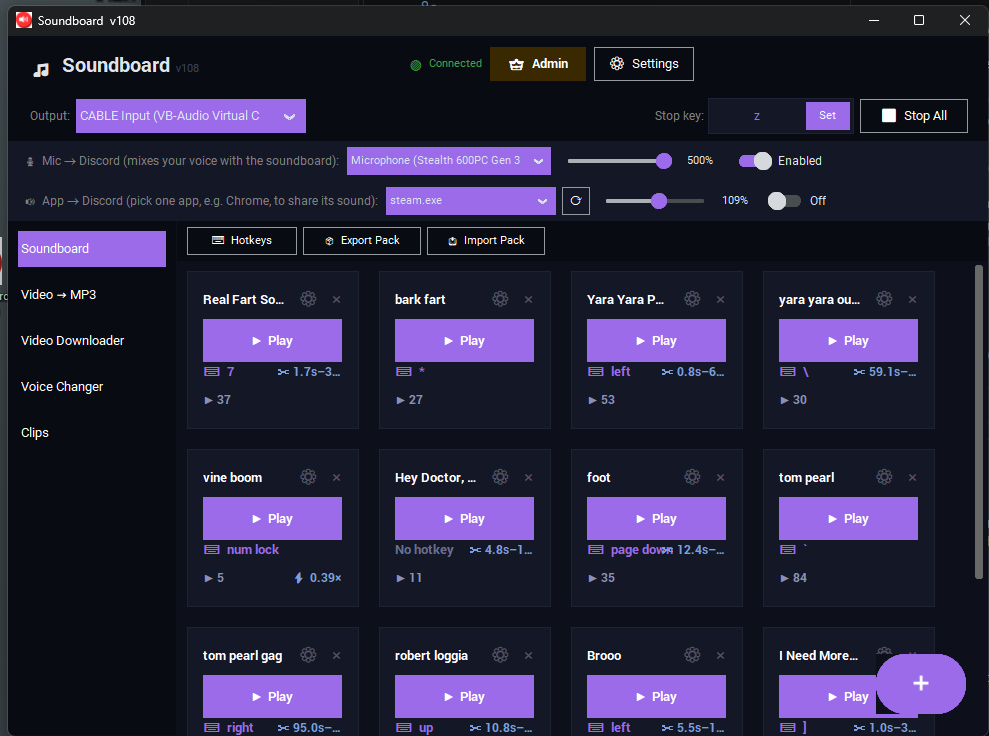
A Windows soundboard for playing sound effects into a mic or Discord call — mic passthrough, per-app audio capture (one specific app, not your whole desktop), and a built-in voice changer with 10 presets. "Lite" means standalone and offline: no accounts, no telemetry, no phone-home.
Free, ready to run — no Python or build step.
The Soundboard Lite interface with audio routing controls and sound clips.
Add clips, trim them in-app, assign global hotkeys, and an "Auto-Level" toggle that evens out loud/quiet sounds.
Mix your mic into the same output your sounds play through, plus capture one specific app's audio independently — not your whole desktop.
Chipmunk, Deep, Demon, Alien, Radio, and more — pitch, tone, and a character effect per preset, with fine-tune sliders and a no-call-needed preview.
Pull a clip from a YouTube URL, convert a local video to a sound, minimize to the system tray or launch straight to it.
No install, no Python. SmartScreen may flag it as unrecognized since it isn't code-signed — "More info" → "Run anyway."
Drop in clips, trim them, and assign hotkeys — everything's saved next to the app automatically.
Install VB-Audio Virtual Cable (free) so Discord can hear your soundboard — the app prompts you when it's missing.
Windows audio routing trips people up more than the app itself does.